What it is
A SWMS — Safe Work Method Statement — is the controlled document that sets out how a high-risk task is done safely: the steps, the hazards at each step, and the controls workers follow. A JSA, or Job Safety Analysis, is its close cousin for breaking a job down the same way. You author one here with a title, a scope of where and what it applies to, and a method statement of the steps, then publish it as a version-controlled document.
The point of a SWMS is that the right safe method reaches the right worker before they begin — and that you can prove they saw it. Opting a document into sign-on-allocation means a published statement is assigned automatically to a worker the moment they are rostered to the matching task, and their acknowledgement is captured. That closes the loop between the document on file and the person doing the work.
When to use it
- A high-risk task needs a documented safe method before anyone does it
- A client or principal contractor requires a SWMS for the work
- You want workers to acknowledge the method before they start the task
- An existing method has changed and needs a new published version
How it works
Step by step.
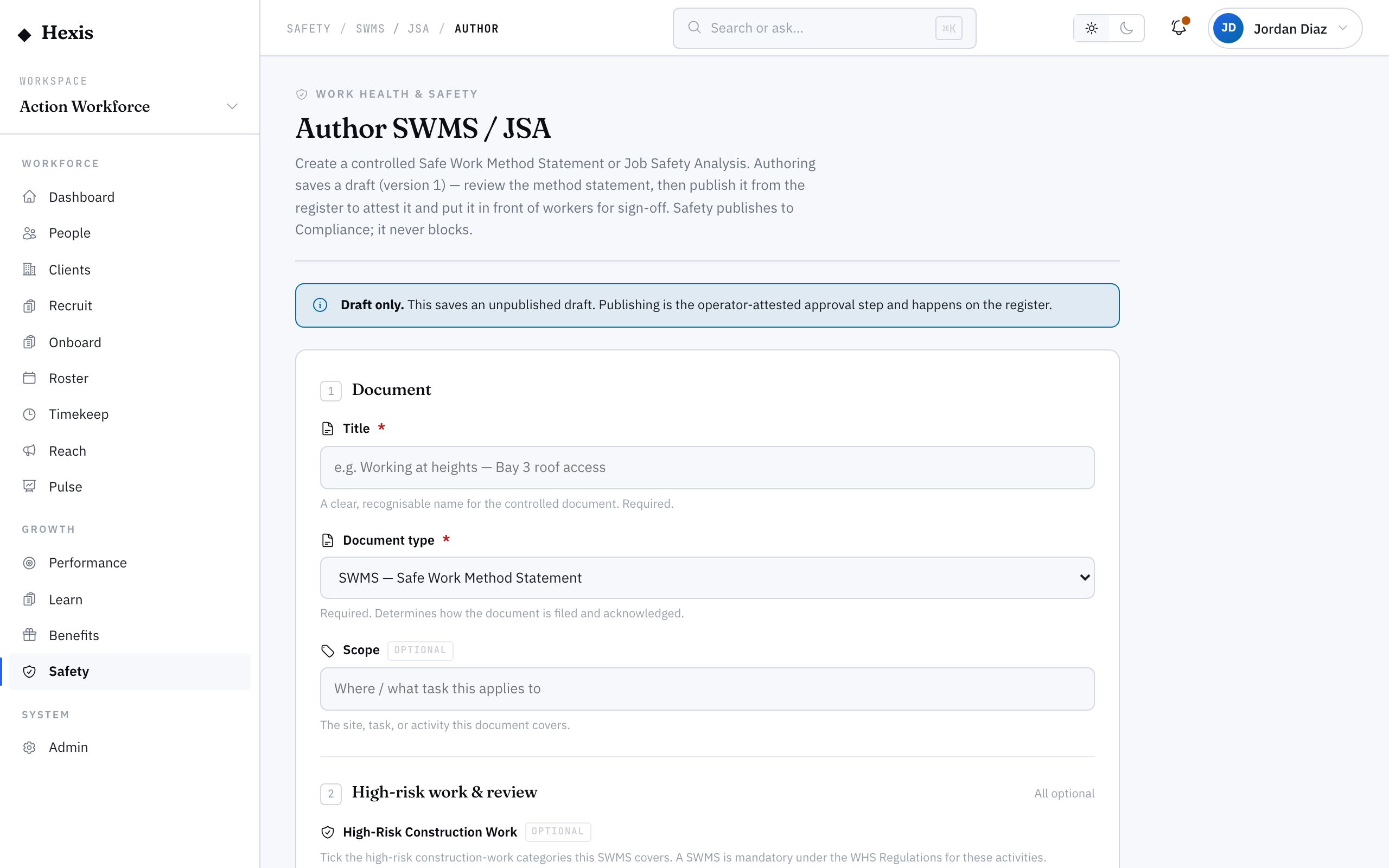
- 1
Title the document
Give it a clear title that names the task it covers, so workers and clients recognise it at a glance.
- 2
Pick the document type
Choose SWMS for a method statement, or JSA for a job safety analysis. Both follow the same step-hazard-control shape.
- 3
Set the scope
Describe where and what task this applies to, so it is clear which work it governs.
- 4
Write the method statement
Lay out the steps, the hazards at each, and the controls workers acknowledge. This is the safe method itself.
- 5
Opt into sign-on-allocation
Turn this on so a published document is assigned to a worker the moment they are rostered to the matching task.
- 6
Publish the version
Publish to make it the live, version-controlled document. Acknowledgements are then captured against it.
Worked example
Follow it through.
The scenario
Coastline Logistics requires a SWMS for working at heights on the Harbour Point Terminal mezzanine.
- 1 Title it "Working at heights — mezzanine maintenance" and pick document type SWMS.
- 2 Set the scope to "Mezzanine areas, Harbour Point Terminal — any task above 2 metres".
- 3 Write the method: access via fixed ladder, harness anchored to rated point, exclusion zone below, spotter present.
- 4 List the hazards and controls at each step — fall from height controlled by harness and anchor, dropped objects controlled by the exclusion zone.
- 5 Turn on sign-on-allocation and publish version 1.
- 6 Maya Chen is rostered to a mezzanine task and the SWMS is assigned for her to acknowledge before she starts.
The result
A published, version-controlled SWMS governs height work at the terminal, and rostered workers acknowledge it automatically before they begin.
Tips & notes
Good to know.
- Write the method in plain, do-this language — the worker on the platform is the audience, not a lawyer.
- Sign-on-allocation is the difference between a document on a shelf and a method workers actually see; turn it on for anything routinely rostered.
- When a method changes, publish a new version rather than editing the old one, so the acknowledgement trail stays honest.
- Track the acknowledgement rate from the SWMS register to see who still owes a sign-off before their shift.
When you’re done
A published SWMS or JSA governs the task and reaches workers to acknowledge before they start, with the trail on record.