What it is
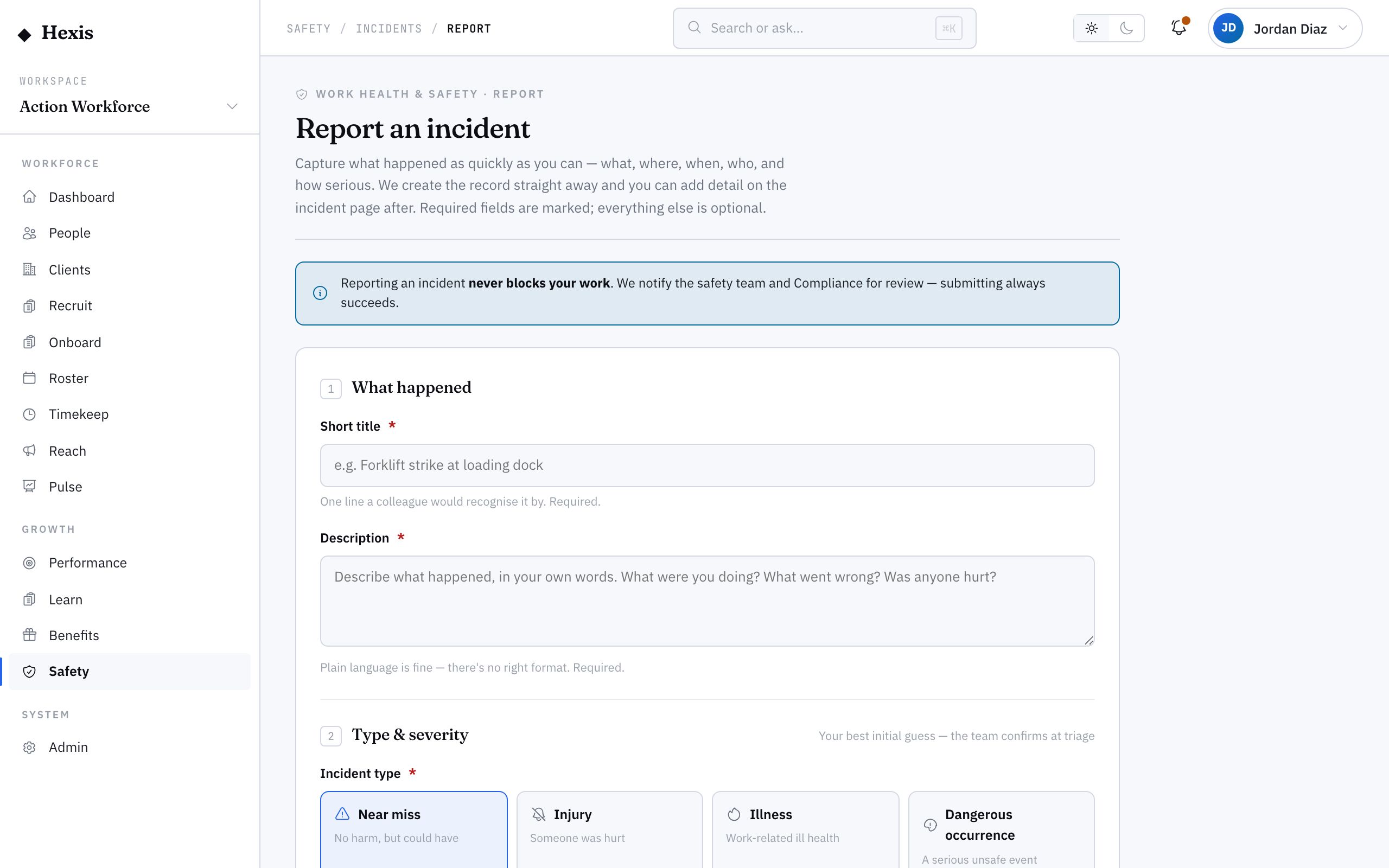
Reporting an incident is how a near miss, injury, illness or dangerous occurrence gets onto the record. The form is short and works on a phone at the site, so the person who saw it can capture the facts while they are fresh — what happened, where, when, who was involved and how bad it looked. The moment you submit, the incident is logged and a coordinator can pick it up to triage by severity, investigate the cause, assign the fixes and close it out.
This full loop — capture, triage, investigate, action, close — is the spine of safety. A near miss reported today is a serious injury prevented next month, and an incident investigated and acted on is one that does not recur. The form defaults the time to now and the reporter to you, so reporting is almost frictionless, and every step on the record is attributed, so the audit trail builds itself.
When to use it
- Someone was hurt, made unwell, or had a close call on site
- A near miss or dangerous occurrence took place, such as a load drop or a vehicle near-strike
- A reported incident needs triaging by severity and investigating
- An incident may be notifiable and needs flagging and tracking
- You are closing out an incident once its corrective actions are done
How it works
Step by step.
- 1
Capture what happened
Give the incident a short title and a plain description, pick the site and refine the exact spot. The time defaults to now; change it if it happened earlier.
- 2
Add who and how bad
Name the people involved and flag anyone injured, mark the type — near miss, injury, illness or dangerous occurrence — and give your honest first severity. Submitting logs it for triage.
- 3
Triage and classify
A coordinator confirms the type and severity and flags it notifiable if it meets the reporting threshold. This moves it on from Reported.
- 4
Investigate the cause
Open an investigation and assign an investigator to capture why it happened. The incident moves to Under investigation.
- 5
Raise corrective actions
For each thing that needs fixing, raise an action with an owner and a due date. Actions also appear in the org-wide actions worklist.
- 6
Close the incident
When the investigation is done and the actions are closed, close the incident. The full state history stays on the record.
Worked example
Follow it through.
The scenario
A forklift clips a racking leg at Docklands Distribution Centre during a Coastline Logistics shift — no injury, but it could have been serious.
- 1 Tom Okafor opens the report form on a phone; the time pre-fills to Mon 9 Jun, 10:42, and he titles it "Forklift contact with racking — Aisle 4".
- 2 He sets the site to Docklands Distribution Centre, marks the type "Dangerous occurrence", severity "Medium", and submits.
- 3 Priya Nair triages it, confirms it is not notifiable, and opens an investigation finding the aisle width was reduced by mis-stacked pallets.
- 4 She raises action 1 — "Re-mark aisle floor lines", owner Liam Brennan, due Fri 13 Jun.
- 5 She raises action 2 — "Refresher on stacking limits at toolbox talk", owner the site supervisor, due Wed 11 Jun.
- 6 When both actions close, Priya closes the incident.
The result
The incident is logged, investigated and closed with a documented cause, two completed corrective actions and a full, attributed state history ready for the monthly client safety pack.
Tips & notes
Good to know.
- Report near misses as readily as injuries — they are the early warning that stops the next one.
- Your honest first severity is enough; the investigator can reclassify it later, so do not agonise over it at capture time.
- Raise corrective actions early, even mid-investigation — the sooner an owner has a due date, the sooner the risk is controlled.
- Anything you reported shows in your personal safety view, so you can follow it through to close-out without chasing anyone.
When you’re done
An incident is captured, investigated and closed with its corrective actions complete and a defensible, attributed record on file.