What it is
A placement is the moment a candidate becomes a worker on a client’s order — the join that the whole pipeline was building toward. Confirming one records who was placed, where, and on what commercial terms, then moves them through offered, accepted and started, ready to be handed to onboarding.
This is where recruiting becomes revenue. Setting the commercials at placement — the permanent fee or the contract margin — is how the work you did turns into a billable, tracked outcome. It also fills the order’s seat and queues the new worker for onboarding, so the handover from "hired" to "ready to work" happens without anything falling through the gap.
When to use it
- A candidate has accepted and you’re confirming the hire
- You need to set the fee or margin on a placement
- An order’s seat needs filling against the candidate you chose
- You’re handing a placed worker to onboarding
How it works
Step by step.
- 1
Open the placements board
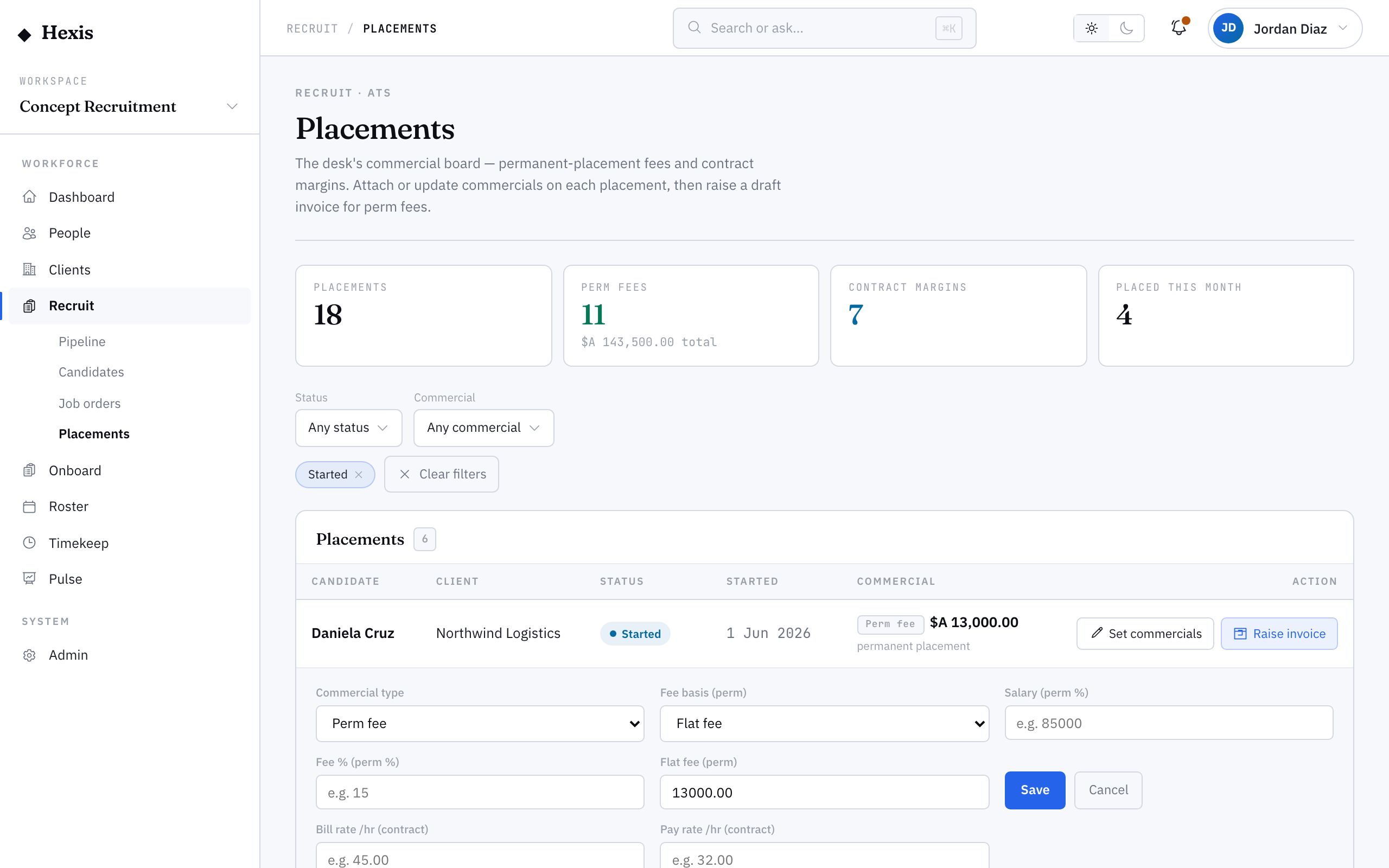
See every placement with its status — offered, accepted, started, completed — plus a meter of your totals and fees at a glance.
- 2
Confirm the placement
Place your chosen candidate against the order. This fills the seat and starts the placement’s lifecycle at offered.
- 3
Set the commercials
On the placement row, set the commercial terms — a permanent fee or a contract margin — so the outcome is priced and tracked.
- 4
Move it through the lifecycle
As the candidate accepts and starts, move the placement from offered to accepted to started so the board reflects reality.
- 5
Hand to onboarding
A confirmed placement queues the new worker for onboarding, so the handover from hired to ready-to-work happens cleanly.
Worked example
Follow it through.
The scenario
Jack Mason accepted the Coastline forklift role at Docklands and you’re confirming the placement.
- 1 Open the placements board; the Coastline forklift order has a seat ready to fill.
- 2 Confirm Jack Mason against the order; the placement opens at "Offered".
- 3 Set the commercials: a contract margin on Jack’s hourly rate for the six-week peak.
- 4 Jack confirms, so you move the placement to "Accepted", then "Started" on Mon 9 Jun.
- 5 The placement queues Jack for onboarding at Docklands Distribution Centre.
The result
Jack is a confirmed, priced placement on the Coastline order, the seat shows filled, and he’s queued for onboarding ahead of his first shift.
Tips & notes
Good to know.
- Set the commercials at confirmation, not later — it’s how the placement becomes a tracked, billable outcome from day one.
- Keep the lifecycle status current; the board’s totals are only as accurate as the statuses behind them.
- A confirmed placement queues onboarding automatically, so there’s no separate handover to remember.
- The hero meter is a quick health read on the desk — placements made, fees, contract margins and what landed this month.
When you’re done
A confirmed, priced placement with the seat filled and the worker queued for onboarding.