What it is
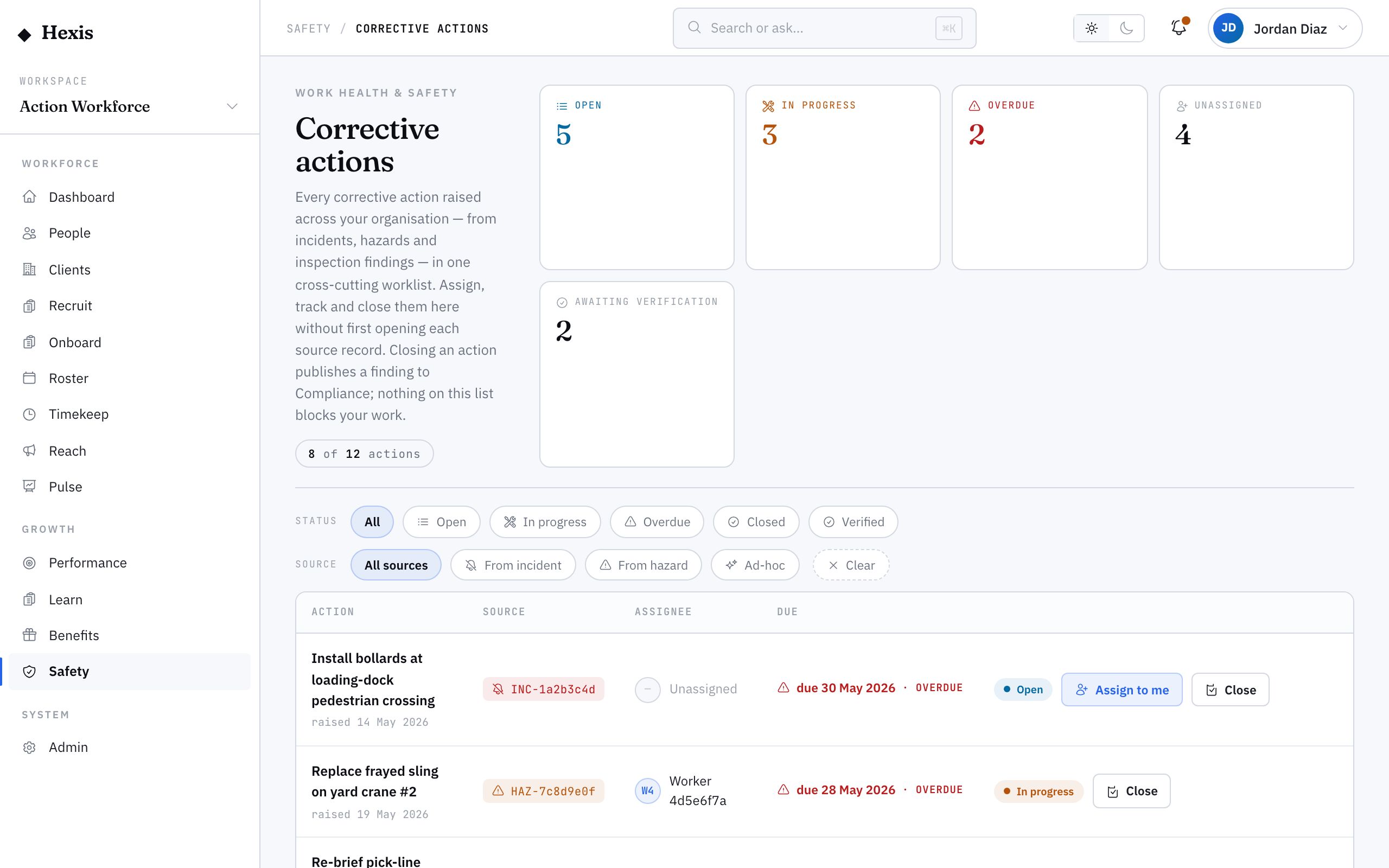
A corrective action is the fix that comes out of an incident, a hazard, an inspection finding or a plain observation — the thing someone has to do to stop a risk recurring. This worklist fans them all in, no matter what raised them, so you can answer the question that matters most: what is open, what is overdue, and what is sitting unassigned across the whole operation. It is the single to-do list for safety.
Actions are where safety either gets done or quietly slips. An incident investigated and never acted on is no safer than one ignored. The cross-org worklist means nothing falls through the cracks between modules — you can sweep overdue items, assign the orphans an owner, and keep every fix moving toward a close, with each one tied back to whatever raised it.
When to use it
- You want one view of every open safety action across the org
- Actions are overdue and need chasing to closure
- An action was raised but never assigned an owner
- A manager asks what is outstanding and who owns it
How it works
Step by step.
- 1
Open the worklist
See every corrective action in one place — those tied to an incident, a hazard or an inspection finding, and ad-hoc ones.
- 2
Filter to what matters
Narrow to overdue, unassigned, or by status to focus on the actions that need you right now.
- 3
Assign the orphans
Give any unassigned action an owner and a due date, so someone is accountable for the fix.
- 4
Chase the overdue
Work the overdue list — follow up the owners, and update status as items progress.
- 5
Close completed actions
When a fix is done, close the action. It updates wherever it was raised, so the incident or hazard reflects it too.
- 6
Trace back to source
Open an action to jump back to the incident, hazard or finding it came from, for the full context.
Worked example
Follow it through.
The scenario
A Monday review of safety actions across all sites turns up overdue and unassigned fixes that need clearing.
- 1 Open the actions worklist and filter to overdue.
- 2 Spot "Re-mark Aisle 4 floor lines" from the Docklands racking near miss is two days overdue; follow up Liam Brennan.
- 3 Filter to unassigned and find "Replace eyewash station tag" with no owner; assign it to Jack Mason, due Fri 13 Jun.
- 4 Update the floor-marking action to in progress after Liam confirms it is scheduled.
- 5 Close "Remove frayed extension lead" once Sofia Russo confirms it is done — the linked observation closes too.
The result
The overdue list is chased, the orphan action has an owner and a date, and a completed fix is closed — updating its source observation automatically.
Tips & notes
Good to know.
- Start the week on the overdue filter; an action that slips its due date is the one most likely to be forgotten.
- Never leave an action unassigned — without an owner and a date, it is a wish, not a fix.
- Closing an action here updates the incident, hazard or finding it came from, so you only close it once.
- Trace an action back to its source when an owner pushes back; the original context usually settles why it matters.
When you’re done
Every safety corrective action is owned, dated and tracked to closure, with nothing overdue or orphaned slipping by.