What it is
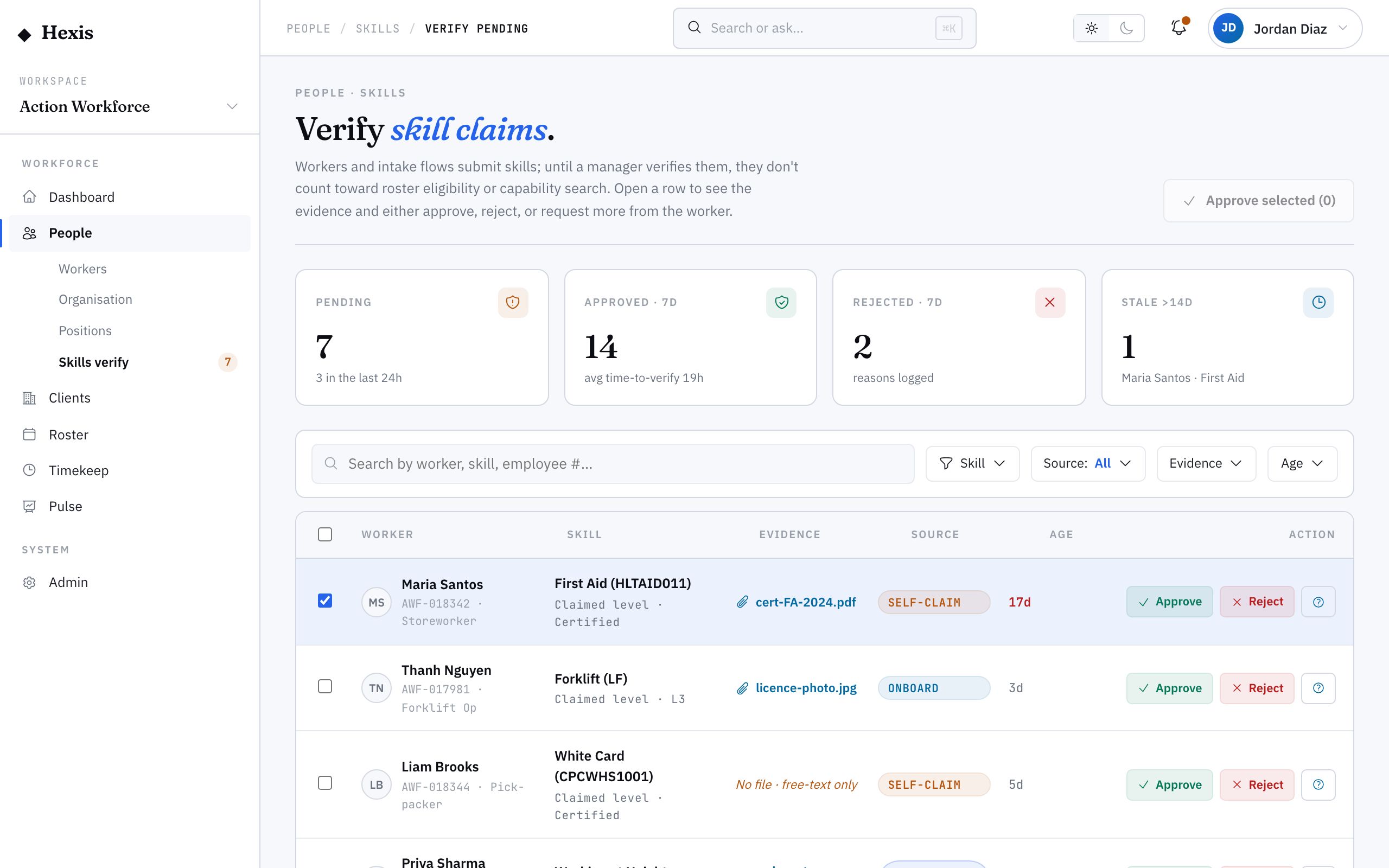
Workers claim skills — at onboarding, after training, when they pick up something new — but a claim isn’t the same as a verified capability. This is the workspace where you turn an unverified claim into a verified one: a queue of pending claims, the evidence shown in place, and approve, reject or request-info as clear decisions.
It matters because deployments lean on verified skills. A self-attested ticket that nobody confirmed is a risk on a client site. Clearing the queue — and clearing batches in one pass when a whole intake attests the same thing — keeps the skills you rely on honest without drowning anyone in one-by-one review.
When to use it
- New starters have self-attested skills at onboarding
- A worker claims a skill after completing training
- You need verified skills before deploying to a client site
- A batch of workers attested the same ticket and need clearing together
- A claim needs evidence before you can confirm it
How it works
Step by step.
- 1
Open the verification queue
Start from skills verification. The queue lists every pending claim waiting on a decision.
- 2
Open a claim
Select a claim to see who attested it, which skill it is, and the evidence attached in place — no jumping to another screen.
- 3
Check the evidence
Read the supporting document or note. Confirm it actually backs the claimed skill before you act.
- 4
Make the decision
Approve to mark the skill verified, reject if the evidence doesn’t hold, or request more information to send it back for evidence.
- 5
Clear in bulk where it makes sense
When a batch attested the same skill with the same evidence, select them together and approve in one action instead of one by one.
Worked example
Follow it through.
The scenario
A new storeworker intake for Coastline Logistics self-attested white-card claims at onboarding — eight pending, all with the same certificate type.
- 1 Open the skills verification queue; it shows eight pending white-card claims.
- 2 Open Jack Mason’s claim and confirm the attached white card is current and matches.
- 3 Spot-check two more, including Sofia Russo, for the same evidence.
- 4 Select all eight claims.
- 5 Approve the selection in one action.
The result
All eight white-card skills are verified, the queue clears, and the intake is good to deploy on that requirement.
Tips & notes
Good to know.
- Bulk-approve only when the evidence really is the same across the batch — spot-check a couple before you do.
- Request-info is the middle path: use it when a claim looks right but the evidence is missing, rather than rejecting outright.
- A verified skill shows as a verified chip on the worker profile, so downstream views can trust it.
- Clear the queue regularly — unverified claims that pile up are deployments waiting on you.
When you’re done
Pending claims are resolved, real capabilities are marked verified, and your deployable skills are trustworthy.