What it is
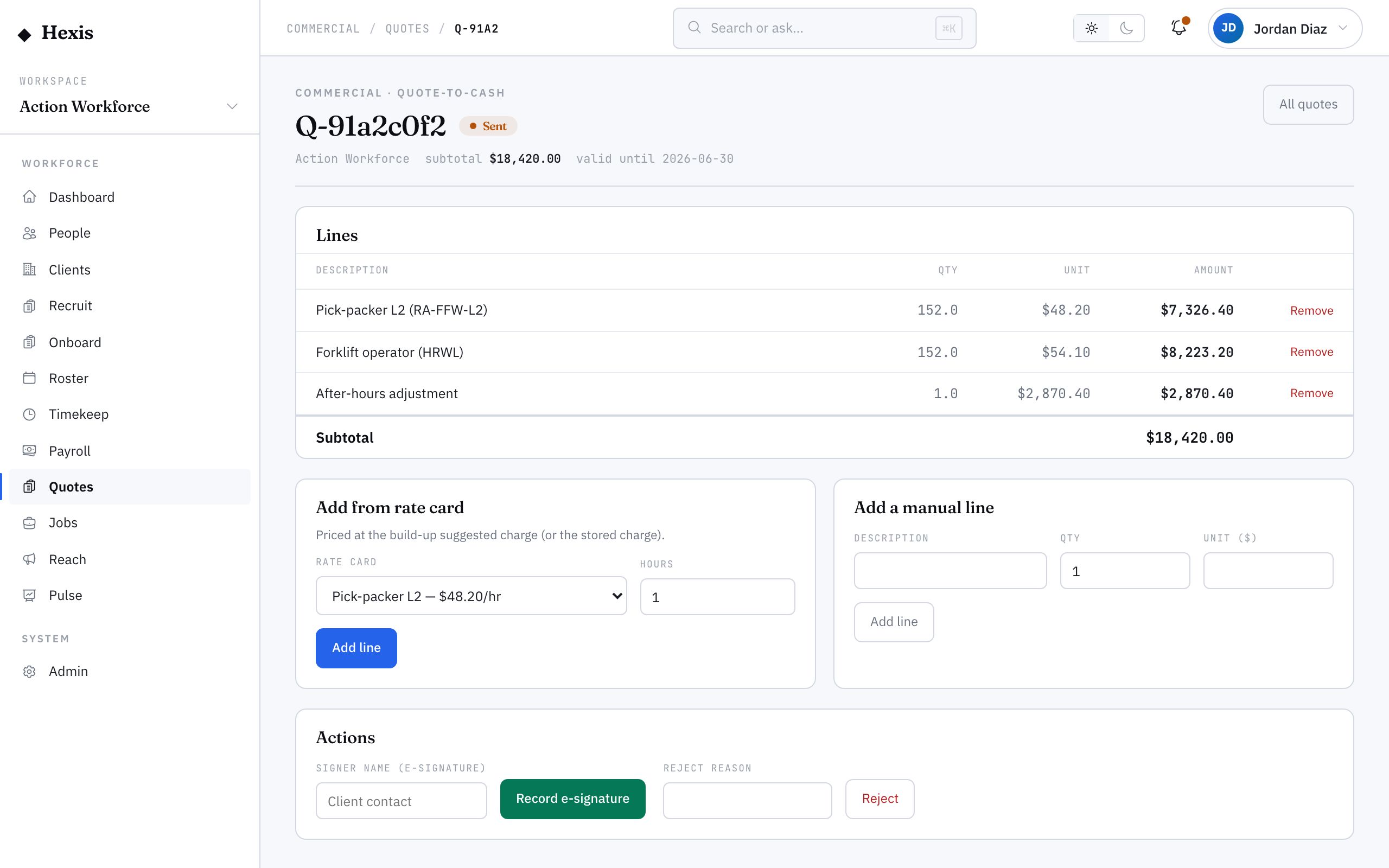
A quote is your priced offer to a client — the front of the quote-to-cash chain. You build it line by line: add a line from a rate card and it prices itself from the build-up — the burdened cost lifted by your target margin — or add a manual adjustment line for anything bespoke. A running subtotal and a valid-until date sit at the top so the offer is always clear.
You use a quote whenever a client needs a firm price before committing — a new contract, a one-off event, a change in scope. Pricing from rate cards keeps margin honest because the charge already reflects pay plus on-costs plus your target margin, rather than a number plucked from the air. Once built, you send it for signature and record acceptance when it comes back.
When to use it
- A client has asked for a price on a new piece of work
- You are quoting a one-off event or a seasonal surge
- Scope has changed and the client needs a fresh figure
- You want pricing that already carries your target margin
- You need a signed offer before rostering or invoicing begins
How it works
Step by step.
- 1
Create the quote
From the quotes register, start a new quote against the client, set the valid-until date and add any notes. You land in the quote workspace.
- 2
Add lines from rate cards
Add a line from a rate card; the unit price comes from the build-up — burdened cost lifted by the card’s target margin — so margin is built in.
- 3
Add manual adjustments
Add a manual line for anything bespoke — a setup fee, a discount, a one-off — that no rate card covers.
- 4
Check the subtotal
Review the running subtotal and the valid-until date so the offer reads cleanly before it leaves.
- 5
Send for signature
Send the quote for signature. It moves from draft to sent and waits on the client.
- 6
Record acceptance
When the client signs, record the e-signature; the quote moves to approved and is ready to flow into a contract or billing.
Worked example
Follow it through.
The scenario
Brightwater Health needs a price for eight care workers over a three-month winter cover.
- 1 Create a quote against Brightwater Health, valid until 30 Jun.
- 2 Add a line from the Care Worker rate card; it prices at 48.50 AUD an hour, margin already built in.
- 3 Add a manual setup line of 750 AUD for induction.
- 4 Confirm the subtotal reads as expected.
- 5 Send the quote for signature, then record Priya Nair’s e-signature when it returns.
The result
Brightwater Health has an approved quote with rate-card pricing plus a setup fee, ready to convert into a contract and billing.
Tips & notes
Good to know.
- Price from rate cards wherever you can — the charge already carries pay, on-costs and your target margin, so you can’t accidentally quote below floor.
- Use manual lines sparingly and label them clearly; they are the lines a reviewer will scrutinise.
- Set a realistic valid-until date — an expired quote protects you from honouring stale pricing.
- A signed quote is the clean handoff into a contract; record the signature rather than tracking it by email.
When you’re done
A priced, margin-safe quote sent and signed, ready to become a contract and flow into billing.