What it is
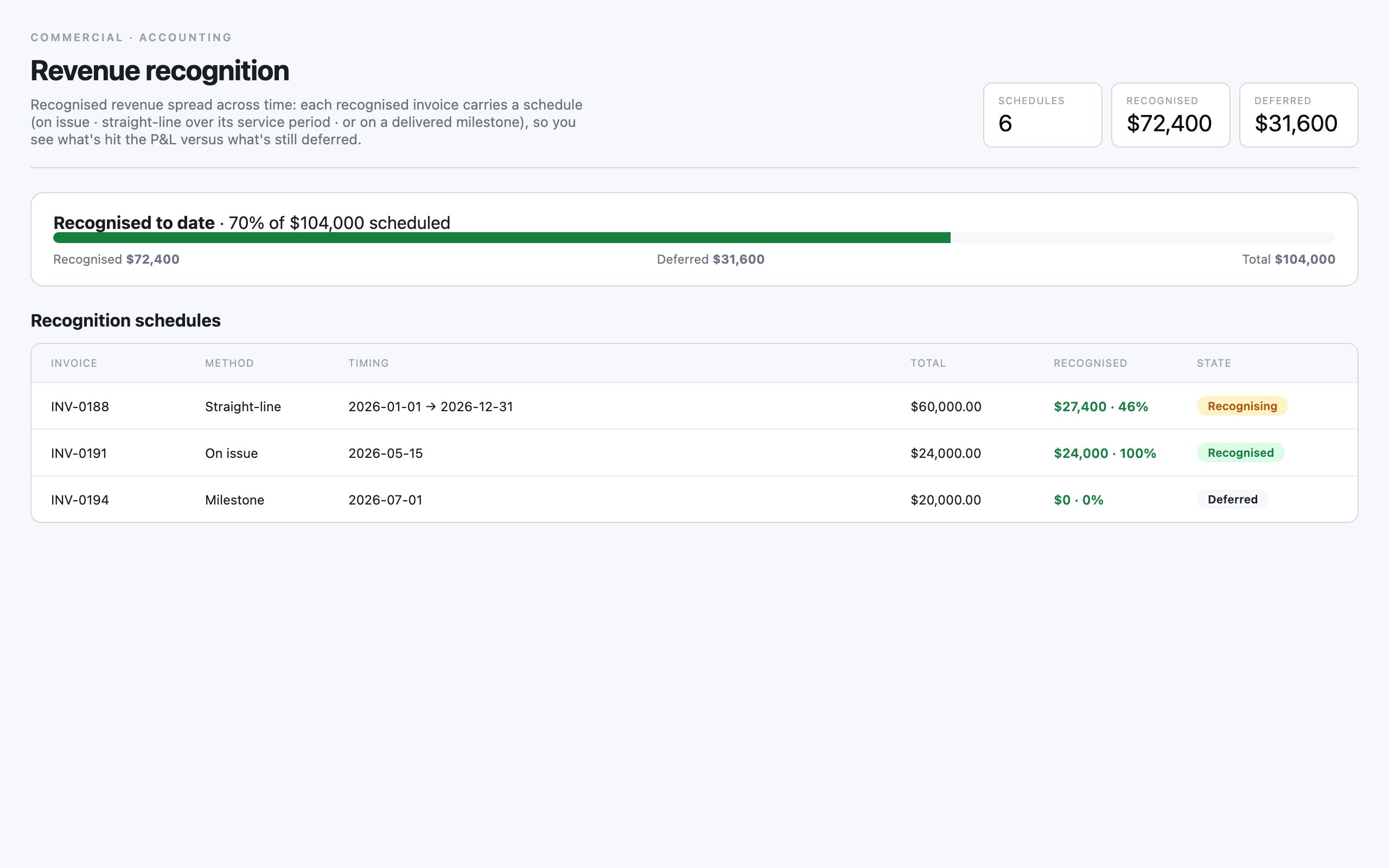
Revenue recognition spreads what you have invoiced across the period it is actually earned, rather than booking it all the day the invoice goes out. A schedule attaches to an invoice and sets the method and timing — how the total is recognised over time — so revenue lands in the right period. A headline band totals your schedules, what has been recognised and what is still deferred, with a meter showing the split.
This matters most for work billed up front but delivered over weeks or months — a quarterly retainer, a fixed-term contract. Recognising revenue as it is earned keeps your reporting honest and avoids a misleading spike in the month you invoiced. The per-invoice register shows each schedule’s method, timing, total, the amount recognised and its state.
When to use it
- You invoice up front but deliver over a longer period
- A retainer or fixed-term contract needs revenue spread over its term
- You want to see how much invoiced revenue is recognised versus deferred
- You are preparing period-end financials and need the recognised figure
- You need a schedule attached to a particular invoice
How it works
Step by step.
- 1
Open the revenue board
Go to the revenue recognition view. The band totals schedules, recognised and deferred; the meter shows the split.
- 2
Create a schedule
Attach a schedule to an invoice, choosing the method and timing for how its total is recognised over the period earned.
- 3
Set the method and timing
Pick how the revenue spreads — evenly across the term, or on another basis — so it lands in the periods the work is delivered.
- 4
Track recognised versus deferred
Watch each schedule’s recognised amount grow and its deferred balance shrink as the period progresses.
- 5
Read the totals at period end
Use the recognised total in the header for period-end reporting, knowing the deferred balance is still to come.
Worked example
Follow it through.
The scenario
Brightwater Health is invoiced 36,000 AUD up front for a three-month care-worker engagement.
- 1 Open the revenue recognition board.
- 2 Create a schedule against the Brightwater Health invoice for 36,000 AUD.
- 3 Set the method to spread evenly across the three-month term.
- 4 After the first month, confirm 12,000 AUD is recognised and 24,000 AUD remains deferred.
- 5 Read the header totals to confirm the recognised figure for the period.
The result
The Brightwater Health invoice recognises 12,000 AUD in month one with 24,000 AUD deferred, so revenue lands as the work is delivered.
Tips & notes
Good to know.
- Recognise revenue over the term you deliver, not the day you invoice — that is what keeps a single month from looking artificially strong.
- The meter is your fastest read of how much invoiced money is still to be earned.
- Attach the schedule to the invoice as soon as it is raised so nothing slips through unrecognised.
- Pair the recognised total with contract value to see how much committed revenue is yet to land.
When you’re done
Invoiced revenue spread across the period it is earned, with recognised and deferred balances clear for reporting.