What it is
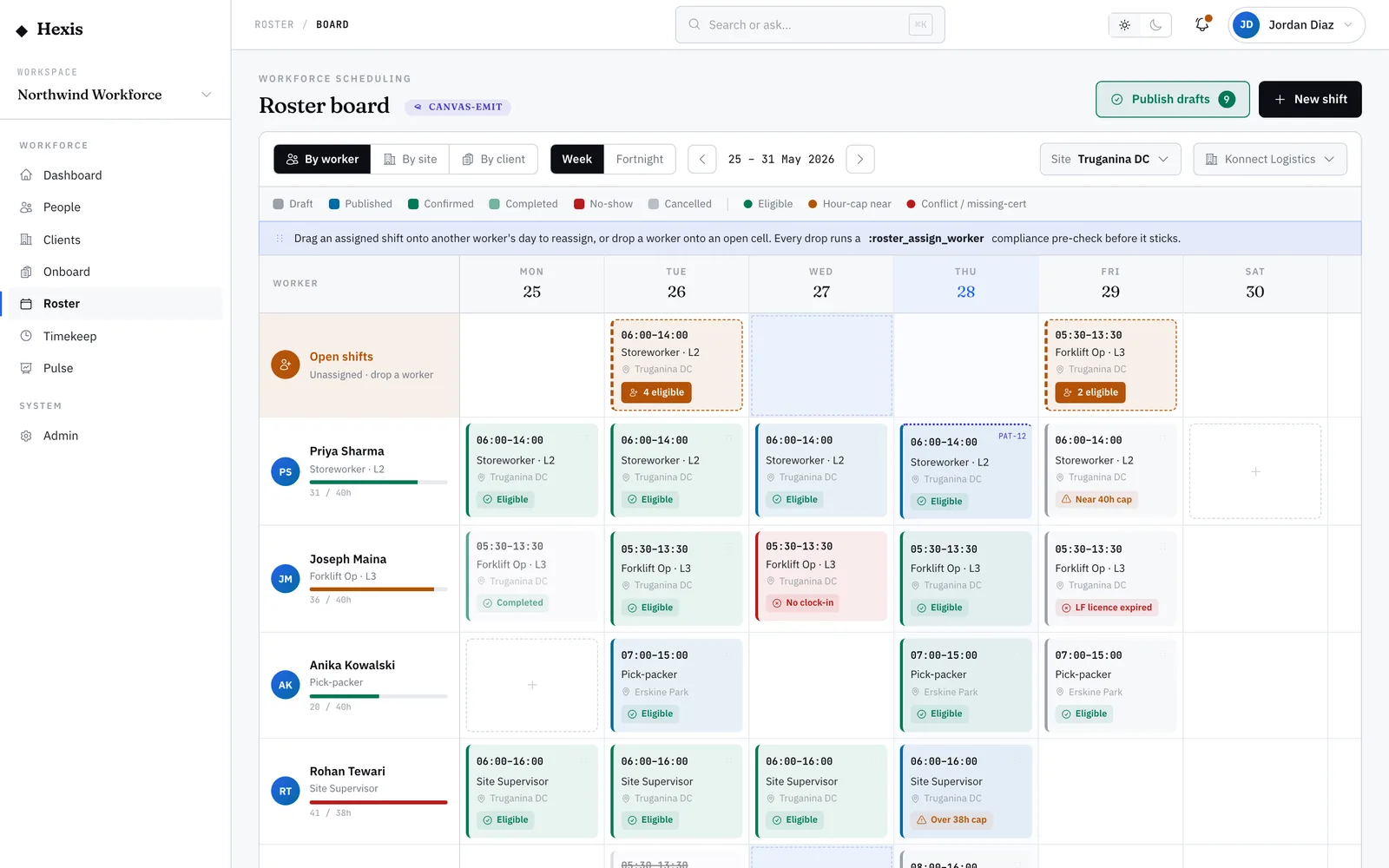
An unfilled shift is a slot on the roster with no one assigned to it. The longer it sits open, the more it risks a no-show at the client site. This feature finds the workers who can actually take the shift — available, qualified and compliant — lets you compare them, and sends the offer without the phone tag.
Use it the moment a gap appears: a late call-out, a new order that lands mid-week, or a shift no one picked up when the roster published. Because Hexis already knows each worker’s availability, tickets and fatigue position, the shortlist you see is only people who can legitimately work it.
When to use it
- A shift published with no worker assigned
- Someone called out and you need a replacement fast
- A new client order added shifts after the roster went out
- You want to offer an open shift to several workers at once
How it works
Step by step.
- 1
Open the unfilled shift
Start from the open-shifts queue or click the empty cell on the roster board. You’ll see the role, site, time window and what the shift requires.
- 2
Review the eligible workers
Hexis lists workers who are available, hold the right tickets and are within fatigue limits for that shift — so you’re only choosing from people who can actually take it.
- 3
Compare and choose
Sort by distance, cost or rating and compare candidates side by side. Pick who to offer it to — one person, or several at once.
- 4
Send the offer
Send the shift offer over the worker’s preferred channel. They can accept from their phone.
- 5
Confirm the fill
When someone accepts, the roster updates, the slot turns from open to confirmed, and your coordinator view clears the gap.
Worked example
Follow it through.
The scenario
A Saturday security shift at Riverside Plaza for Meridian Retail just opened after a call-out — 14:00–22:00.
- 1 Open the open-shifts queue; the Saturday 14:00–22:00 Security Officer slot at Riverside Plaza shows "0 assigned · 6 eligible".
- 2 Click the shift. Six workers are listed; sort by distance.
- 3 Maya Chen is closest (4 km), holds a current security licence, and is under her weekly hours cap.
- 4 Select Maya and one backup, Tom Okafor, and send the offer by SMS.
- 5 Maya accepts from her phone two minutes later.
The result
The slot flips to "Confirmed — Maya Chen", the gap clears from the roster board, and Tom’s offer is withdrawn automatically.
Tips & notes
Good to know.
- Offer to a backup at the same time — the first to accept gets it, the rest are withdrawn, so you’re not waiting on one person.
- A red eligibility flag means the worker can’t legally take the shift (expired ticket or fatigue breach); amber means check something before you commit.
- You can fill straight from the roster board by clicking the empty cell — same shortlist, fewer clicks.
- If no one is eligible, widen the radius or check whether a ticket lapsed that L&D can renew.
When you’re done
The shift is covered by a qualified, available worker, the roster is up to date, and the client site keeps its coverage.