What it is
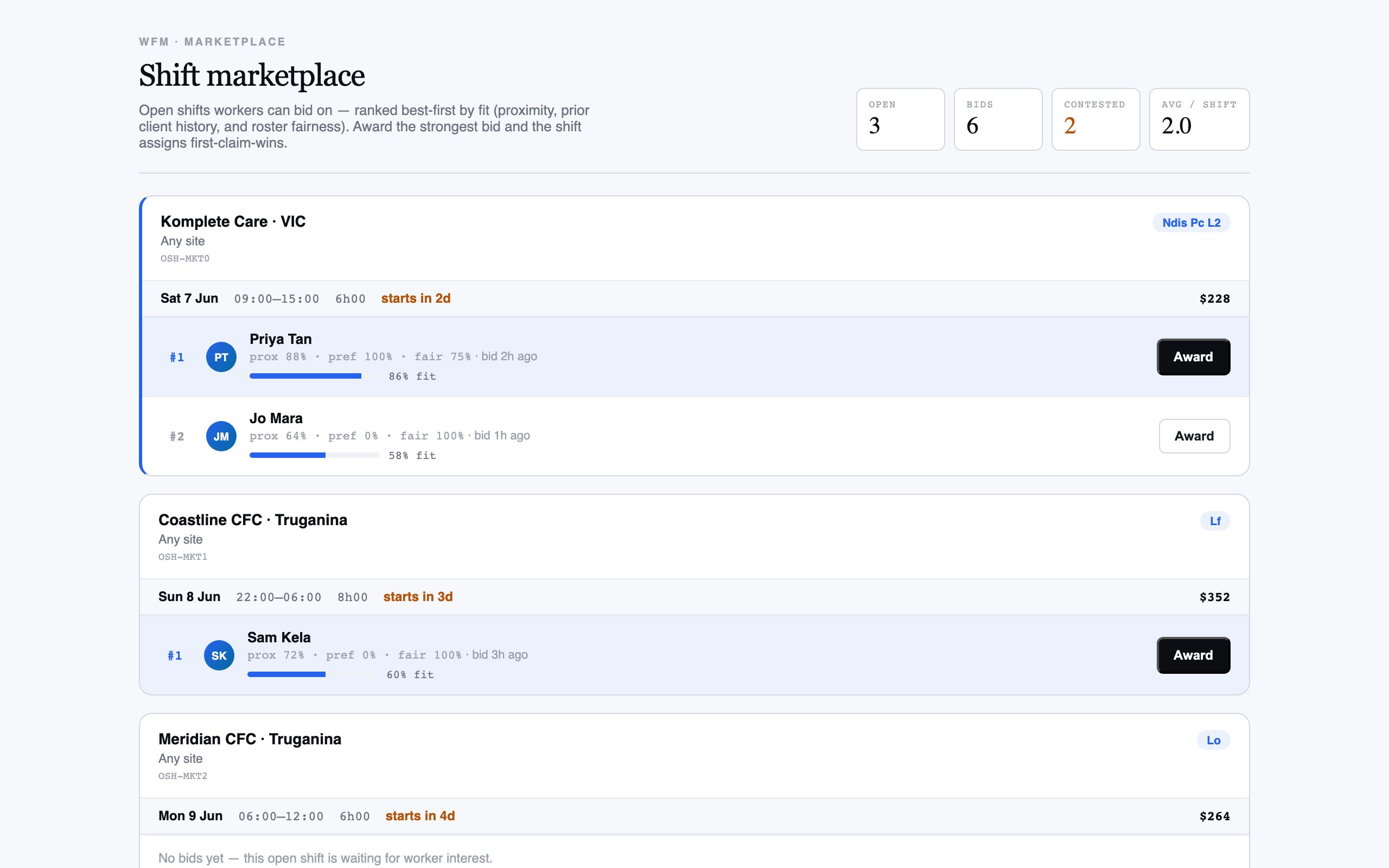
The shift marketplace turns your open-shift pool into a bid board. Workers see the open shifts they could take and put their hand up; for each contested shift you get the bidders ranked by fit — how close they are, their history with the client, and how fairly the work has been shared lately.
You award the shift to the bidder you choose, and the rest are released. The first award wins, so two coordinators can’t hand the same shift to two people. It’s the lighter-touch way to fill when you’ve got willing workers — they opt in, you pick the best fit, and nobody’s on the phone.
When to use it
- You have open shifts and workers willing to put their hand up
- You want workers to opt in rather than chasing them one by one
- Several people want the same shift and you need a fair way to choose
- You’d like the fit ranking done for you before you award
How it works
Step by step.
- 1
Open the marketplace
See the open shifts that are out for bids and how many workers have put their hand up for each.
- 2
Open a contested shift
Pick a shift with bidders. The workers who bid are listed in fit order, strongest match first.
- 3
Read the ranking
Rank reflects proximity, prior history with the client and fairness — so the top bidder is the best-rounded fit, not just the nearest.
- 4
Award the shift
Award it to your chosen bidder. The shift assigns to them and the other bids on that shift are released.
- 5
Confirm coverage
The shift moves out of the open pool and onto the roster as confirmed, and the marketplace clears it.
Worked example
Follow it through.
The scenario
A Sunday Event Steward shift at Riverside Plaza for Summit Events drew four bids, 10:00–18:00.
- 1 Open the marketplace; the Sunday Event Steward shift shows "4 bids".
- 2 Open it — Jack Mason ranks first on proximity and prior Summit Events history.
- 3 Aisha Rahman ranks second; she’s nearby but has worked more recent shifts, so fairness nudges her down.
- 4 You award the shift to Jack.
- 5 The other three bids are released automatically.
The result
The Sunday shift is confirmed for Jack Mason, the three unsuccessful bids are cleared, and the shift drops off the open pool.
Tips & notes
Good to know.
- The ranking balances three things — nearest isn’t always top once history and fairness count.
- First award wins, so you and another coordinator can’t double-assign the same shift.
- Use fairness to spread the popular shifts; it nudges down workers who’ve had a recent run of them.
- The marketplace and the open-shifts queue draw from the same pool — use the marketplace when workers will opt in, the queue when you need to reach out.
When you’re done
Open shifts are filled by workers who opted in, awarded to the best fit, with losing bids released cleanly.