What it is
A payslip is the worker’s legal record of a pay run — employer name and ABN, the period, gross, PAYG, super, deductions, net and the year-to-date figures. Hexis produces one per worker the moment a run finalises, as a fixed, tamper-evident record. Behind each payslip sits the earnings statement: that worker’s full slice of the run, with every line broken out by kind and the leave balances after the run.
Between them they answer the two questions you get most — “where’s my payslip?” and “why is this number what it is?”. The payslip index is the shelf you search; the earnings statement is the line-by-line explanation. Because each line carries the rule that produced it, you can explain a Saturday penalty or a meal allowance in plain English without opening the award.
When to use it
- A worker can’t find their payslip and asks you for it
- A worker asks why their pay is a particular amount
- You need to confirm payslips were produced for a finalised run
- You’re reconciling year-to-date, tax or super for one worker
- An auditor requests the record for a past period
How it works
Step by step.
- 1
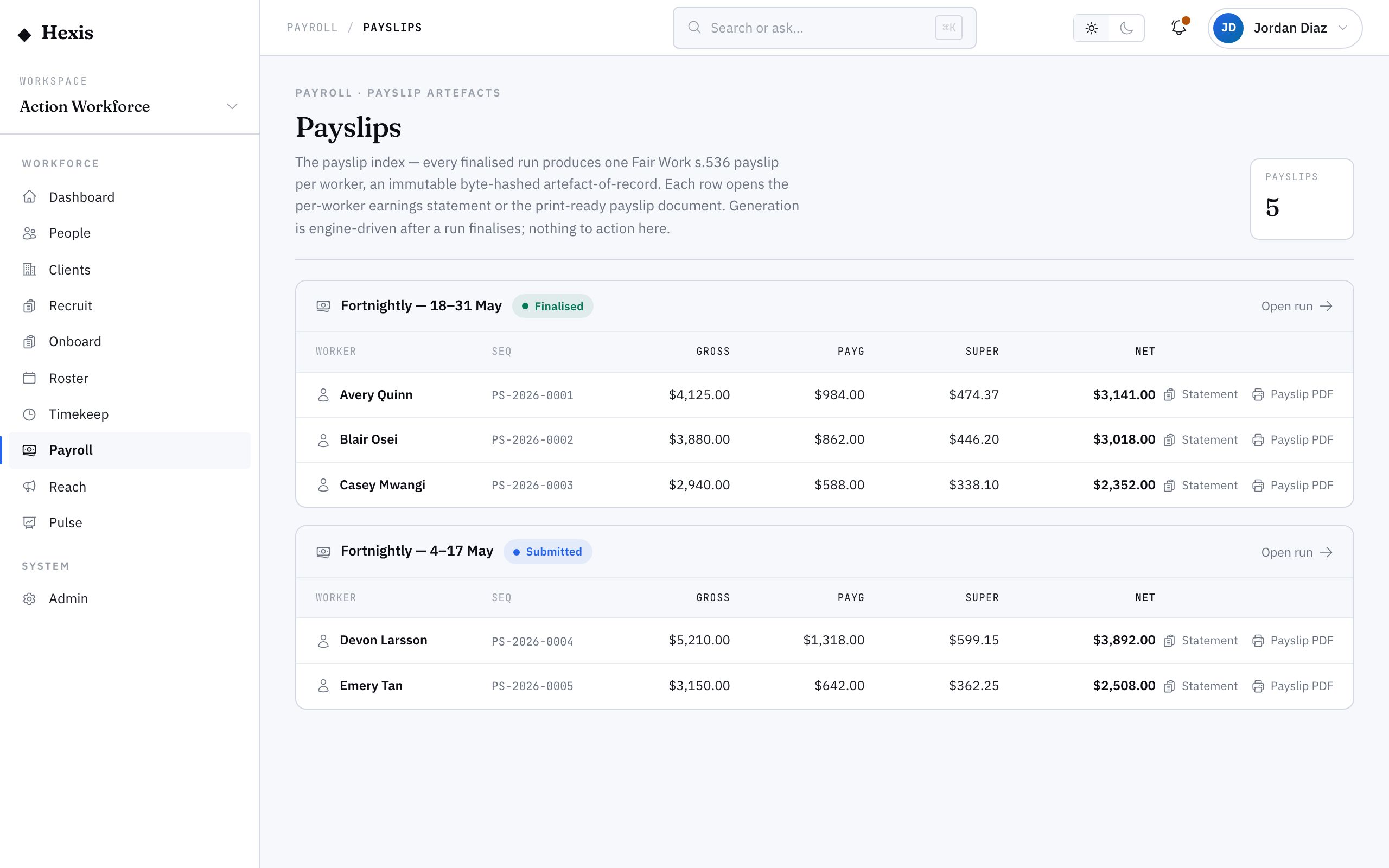
Open the payslip index
It lists the recent finalised runs that produced payslips, grouped per run, newest first.
- 2
Pick the run and worker
Choose the run for the period, then find the worker’s row — gross, PAYG, super and net at a glance, with a sequence number that’s their stable reference for that run.
- 3
Open the earnings statement
Click through to the worker’s statement: the header with their classification and period, the four totals, and every earnings line.
- 4
Walk the lines
Each line is grouped by kind — ordinary, overtime, penalty, allowance, leave or adjustment — with hours, rate, amount and the rule that produced it.
- 5
Check the leave balances
See annual, personal and long-service leave accrued this period and the balance after the run, so you can confirm an accrual or a leave deduction.
- 6
Explain, confirm or correct
Use the line reasons to answer the worker, or confirm the payslip. If a figure is genuinely wrong, the fix is a correction run — the payslip itself is fixed once finalised.
Worked example
Follow it through.
The scenario
Maya Chen, a Cleaner placed at Meridian Retail, asks why her fortnightly net is higher than usual.
- 1 Open the payslip index; the “FN · 26 May–8 Jun” run is at the top.
- 2 Find Maya’s row — gross $3,180.40 · PAYG $642.00 · super $381.65 · net $2,538.40.
- 3 Open her earnings statement; the lines show 76 ordinary hours at $34.20 plus 6 Saturday penalty hours at $51.30.
- 4 The Saturday penalty is the reason the net is up; leave balances show 4.6 hours annual leave accrued, balance 62.1 hours.
- 5 You explain the Saturday penalty to Maya from the line reason and confirm the payslip is correct.
The result
Maya’s payslip is located and confirmed, and she understands her higher net came from six Saturday penalty hours.
Tips & notes
Good to know.
- Payslips are fixed once the run finalises — if a figure is wrong, the path is a correction run, not an edit to the slip.
- Each line’s reason is the same rule the award engine applied, so it’s safe to read out to a worker word for word.
- Workers can see their own payslips, so most “where’s my payslip” questions are a pointer, not a re-issue.
- The sequence number is a stable reference for a worker within a run — quote it when answering a query.
- Year-to-date figures on the statement are your end-of-year reconciliation source.
When you’re done
A confirmed, findable payslip for every worker on a finalised run, with the full line-by-line statement behind it.