What it is
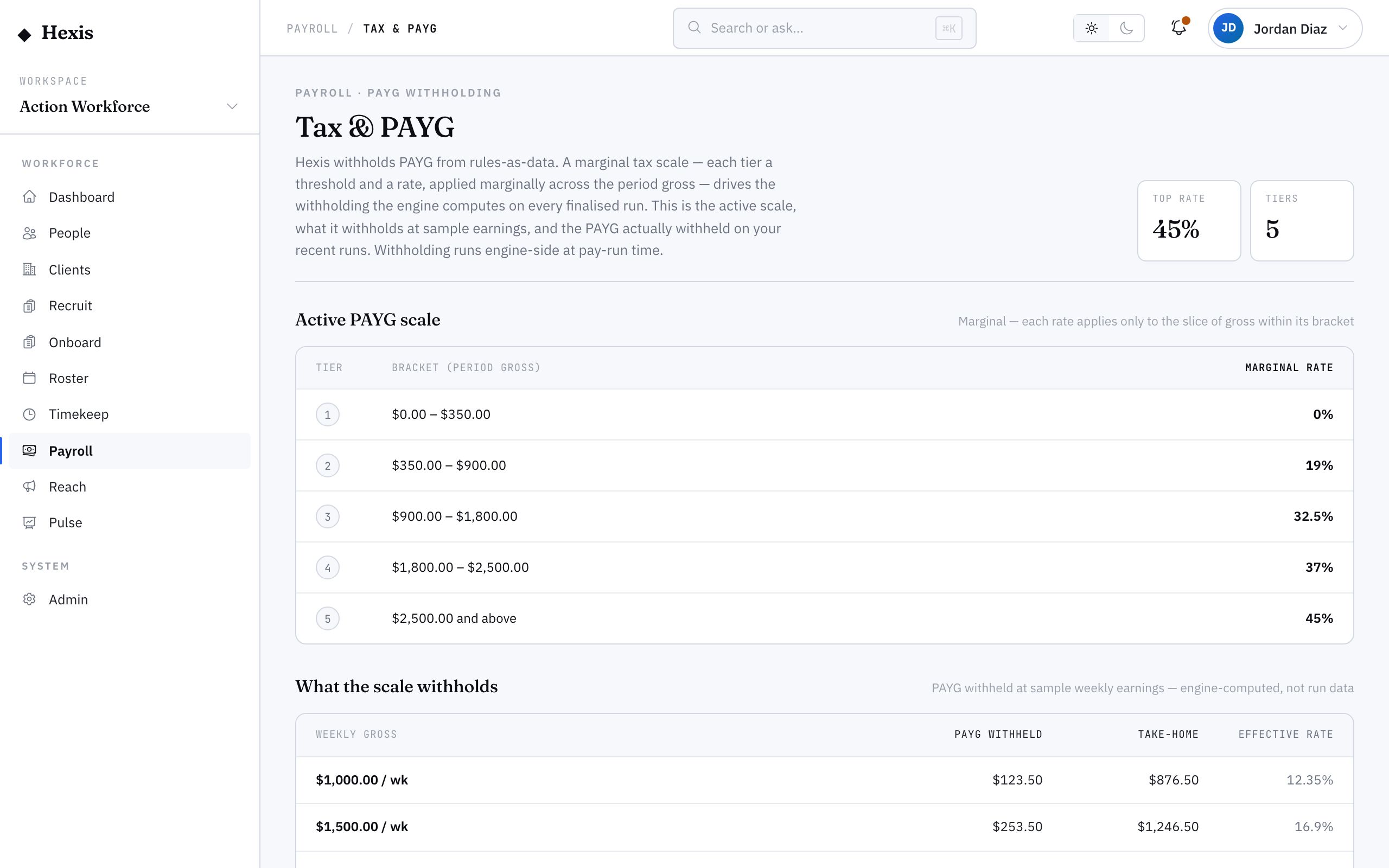
PAYG (pay-as-you-go) is the tax withheld from each pay and sent to the ATO on the worker’s behalf. Hexis withholds it from rules-as-data: a marginal tax scale of brackets — each with a threshold and a rate — applied across the period’s gross. This surface makes that engine visible: the active scale, what it withholds at sample weekly earnings, and how the figure was reached on a real run.
You don’t maintain the brackets by hand, but you should be able to see them and trust them. When a worker questions their tax, or you’re reconciling withholding for a period, this is where you confirm the scale in force and how it produced the number on the payslip.
When to use it
- A worker asks why their tax is a certain amount
- You want to confirm the active tax scale before a run
- You’re reconciling total PAYG withheld for a period
- You need to illustrate withholding at a given weekly earning
How it works
Step by step.
- 1
Open the tax window
It shows the active marginal scale — the bracket structure and the rate for each tier — applied across the period’s gross.
- 2
Read the scale
Each tier has a threshold and a marginal rate; tax is applied marginally up the brackets, not as one flat rate on the whole amount.
- 3
Check the samples
See what the scale withholds at sample weekly earnings — a quick illustration to sanity-check the engine without opening a run.
- 4
Trace a run’s PAYG
Open a finalised run’s tax figure to see how the scale produced the withholding for that period’s gross.
- 5
Explain or reconcile
Use the scale and the sample to explain a worker’s withholding, or sum the run figures to reconcile the total PAYG for the period.
Worked example
Follow it through.
The scenario
Jack Mason, a Security Officer, queries why his fortnightly tax went up alongside his pay.
- 1 Open the tax window and read the active marginal scale.
- 2 At his usual weekly earning the sample shows around $214 withheld; at his higher week it shows more.
- 3 Open Jack’s run; his gross rose with Saturday penalties, pushing part of it into a higher bracket.
- 4 The run’s PAYG line shows the marginal calculation across the brackets.
- 5 You explain that only the amount above the threshold is taxed at the higher rate, not the whole pay.
The result
Jack understands his extra tax came from marginal withholding on the higher-earning week, and the run’s PAYG reconciles.
Tips & notes
Good to know.
- Tax is marginal — only the slice above each threshold is taxed at the higher rate, which is the usual answer to “why did my tax jump?”.
- The sample withholding is an illustration to sanity-check the scale; the real figure always comes from the run’s actual gross.
- When you reconcile a period, the sum of each run’s PAYG line is the total reported to the ATO for that period.
- PAYG and super are separate obligations — tax goes to the ATO, super to the worker’s fund — and each has its own surface.
When you’re done
A clear view of the active tax scale and how PAYG was withheld on each run, ready to explain or reconcile.