What it is
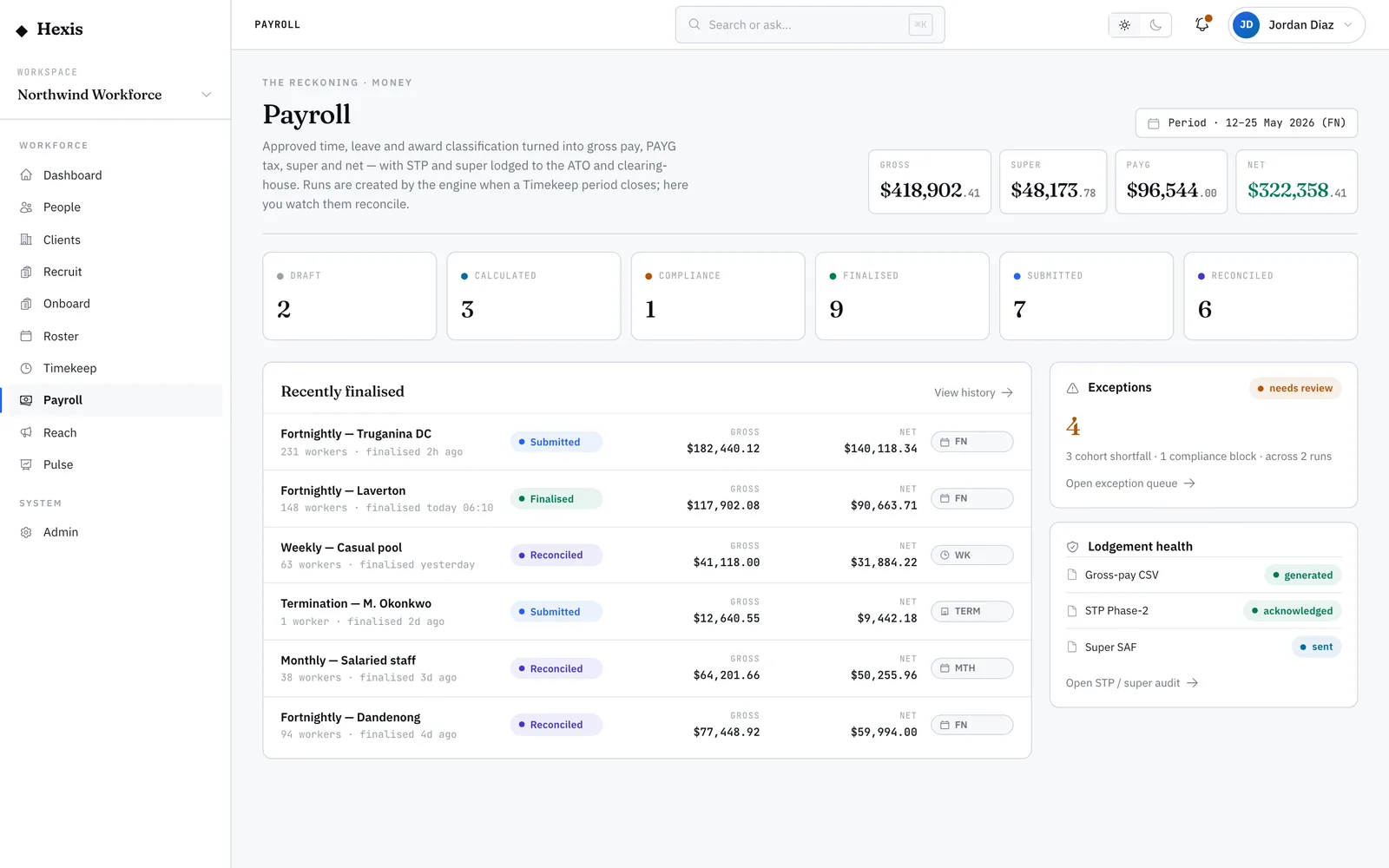
A pay run takes everyone’s approved hours and leave for a period and works out what each person is actually paid: their gross pay under the right award, the tax withheld, the super owed, and the net that lands in their account. The pay-run dashboard is where you do that — calculate the run, read the totals, look at each worker’s lines, and finalise once it balances.
This is the heartbeat of the operation. Get it right and people are paid correctly and on time, the government reporting flows on its own, and nobody chases a missing shift. Hexis interprets the award rules for you, flags anything that looks wrong before you commit, and only lets you finalise once the compliance checks pass.
When to use it
- It’s the end of a pay period and timesheets are approved
- You want to see the gross, tax, super and net for the whole cohort before paying
- A run is sitting calculated and you need to finalise it
- You need each worker’s pay broken down line by line to answer a query
How it works
Step by step.
- 1
Open the run
Start from the payroll control room, the run history, or an exception. The run header shows the period, the cohort it covers and where it is in its lifecycle — draft, calculated or finalised.
- 2
Calculate the pay
Run the calculation. Hexis applies each worker’s award and classification to their approved hours and leave, then works out gross, PAYG tax, super and net for everyone in the cohort.
- 3
Read the four totals
Check the headline gross, PAYG, super and net for the whole run. These are the numbers you’re committing to — compare them against what you expect for the period.
- 4
Drill into the workers
Expand any worker to see their lines by kind — ordinary, overtime, penalty, allowance, leave and adjustment — each with hours, rate and amount. This is where you answer “why is Maya’s pay this number?”.
- 5
Clear any flags
Anything the run flagged for a human shows up in the exception queue. Resolve those before you finalise — a missing classification or a negative net will hold the run.
- 6
Finalise
Finalise the run. The compliance checks run at the gate; if they pass, the run locks, payslips are produced and the government lodgements queue up.
Worked example
Follow it through.
The scenario
It’s the fortnightly run for Northwind Workforce covering Mon 26 May to Sun 8 Jun, 38 workers across Meridian Retail and Coastline Logistics sites.
- 1 Open the fortnightly run; the header reads “FN · 26 May–8 Jun · 38 workers · Calculated”.
- 2 The totals show gross $164,820.00 · PAYG $38,910.00 · super $19,778.40 · net $125,910.00.
- 3 Expand Maya Chen — 76 ordinary hours at $34.20, plus 6 Saturday penalty hours and a $24.80 meal allowance.
- 4 One exception is flagged: Tom Okafor has no classification on a new placement; you set it to Warehouse Operator Level 2 and recalculate.
- 5 The run recalculates cleanly, the totals settle, and you finalise.
The result
The run flips to “Finalised”, 38 payslips are produced, and the STP and super lodgements are queued for the period.
Tips & notes
Good to know.
- Always read the four totals against last period before finalising — a big swing usually means a missing or duplicated timesheet, not a pay error.
- You can finalise straight from the dashboard once the queue is clear; there’s no separate “submit” step to forget.
- Every earnings line carries a plain-English reason for the number, so you can answer a worker’s query without opening the award document.
- If the run won’t finalise, it’s almost always a compliance block — open the exception queue and the reason is spelled out there.
When you’re done
A finalised pay run with correct gross, tax, super and net for every worker, payslips issued and reporting queued.