What it is
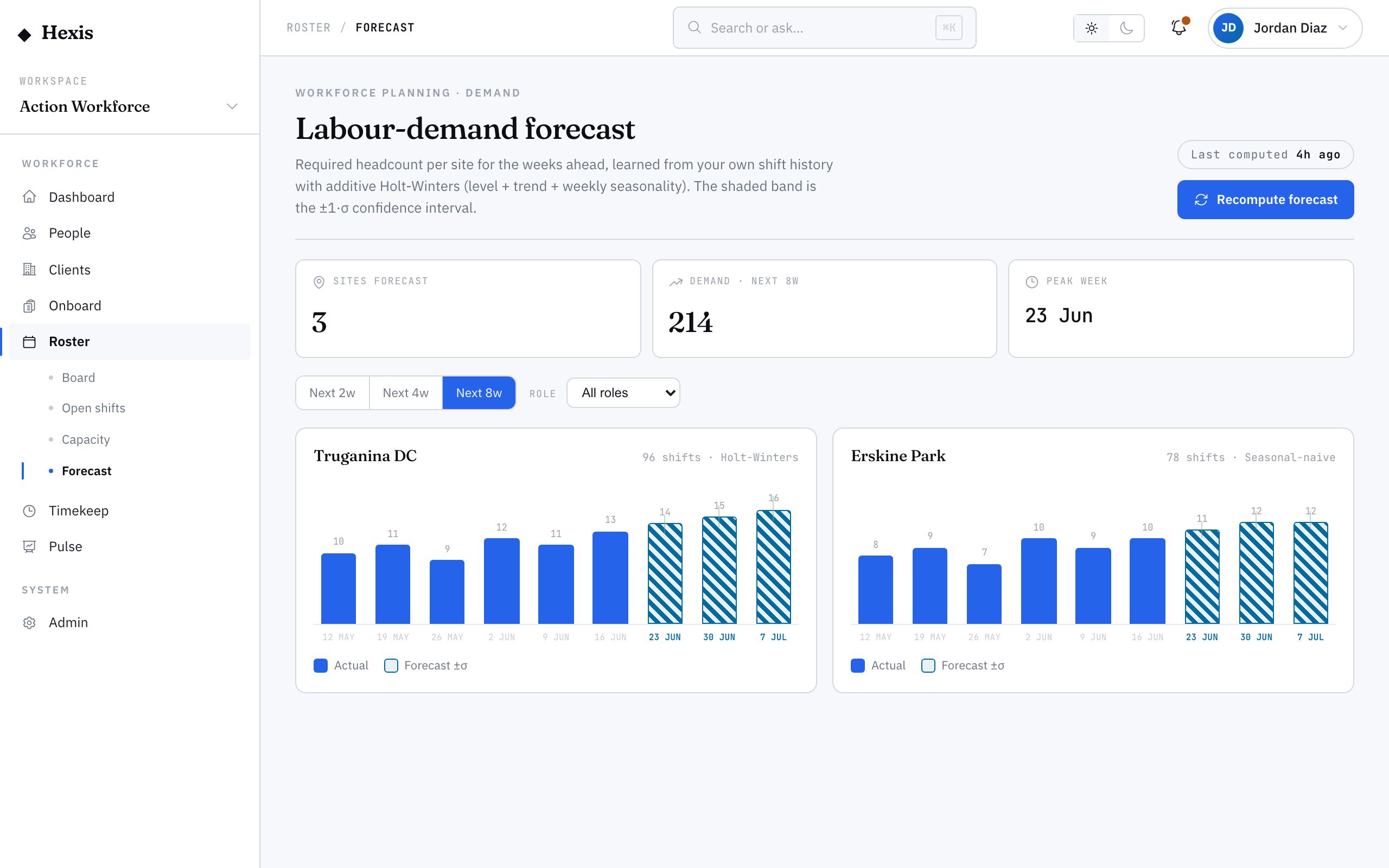
The demand forecast answers a single question: how much labour will we need? For each site and role it projects the weeks ahead from the trailing weeks of actuals, so you’re scheduling to a number rather than a guess.
It’s the starting point of the planning loop. The forecast tells you the shape of demand; capacity planning tells you whether you can cover it; the labour budget tells you what it should cost. Reading the forecast first means you build the roster around real expected load instead of repeating last week out of habit.
When to use it
- You’re planning the weeks ahead and want a demand baseline
- You need to size a roster to expected load, not last week’s
- A client’s volume is changing and you want to see the trend
- You’re checking which sites will need more or fewer people
How it works
Step by step.
- 1
Open the forecast
The view resolves your forecast sites and the roles across them, with the date it was last computed shown up top.
- 2
Pick a site and role
Scope to the site and role you’re planning. Each site charts against its own scale so a small site isn’t lost next to a big one.
- 3
Read the trend
Compare the trailing weeks of actuals with the projected weeks ahead to see whether demand is rising, steady or falling.
- 4
Set your horizon
Choose how many weeks forward to project, depending on how far ahead you’re rostering.
- 5
Carry it into planning
Use the projected need as the target headcount when you check capacity and build the roster.
Worked example
Follow it through.
The scenario
You’re planning four weeks ahead for Coastline Logistics at Docklands Distribution Centre, where order volume has been climbing.
- 1 Open the forecast and scope to Docklands, role Warehouse Operator.
- 2 The last six weeks of actuals show a steady rise from 28 to 36 shifts a week.
- 3 The four-week projection continues the climb to roughly 40 shifts a week.
- 4 Set the horizon to four weeks.
- 5 Note the projected need as your target for the capacity check.
The result
You have a clear, site-specific demand number — around 40 Warehouse Operator shifts a week at Docklands — to plan capacity and build the roster against.
Tips & notes
Good to know.
- Each site is charted against its own peak, so read the shape of the trend rather than comparing bar heights across sites.
- Check the last-computed stamp — if it’s stale, the actuals behind it may not include the most recent weeks.
- Forecast first, then check capacity, then watch the budget — that order keeps planning grounded in real demand.
- A sharp jump in a single week is often a one-off event; look at the run of weeks before you resize a standing roster.
When you’re done
A site-and-role demand projection for the weeks ahead that anchors capacity planning and roster build.