What it is
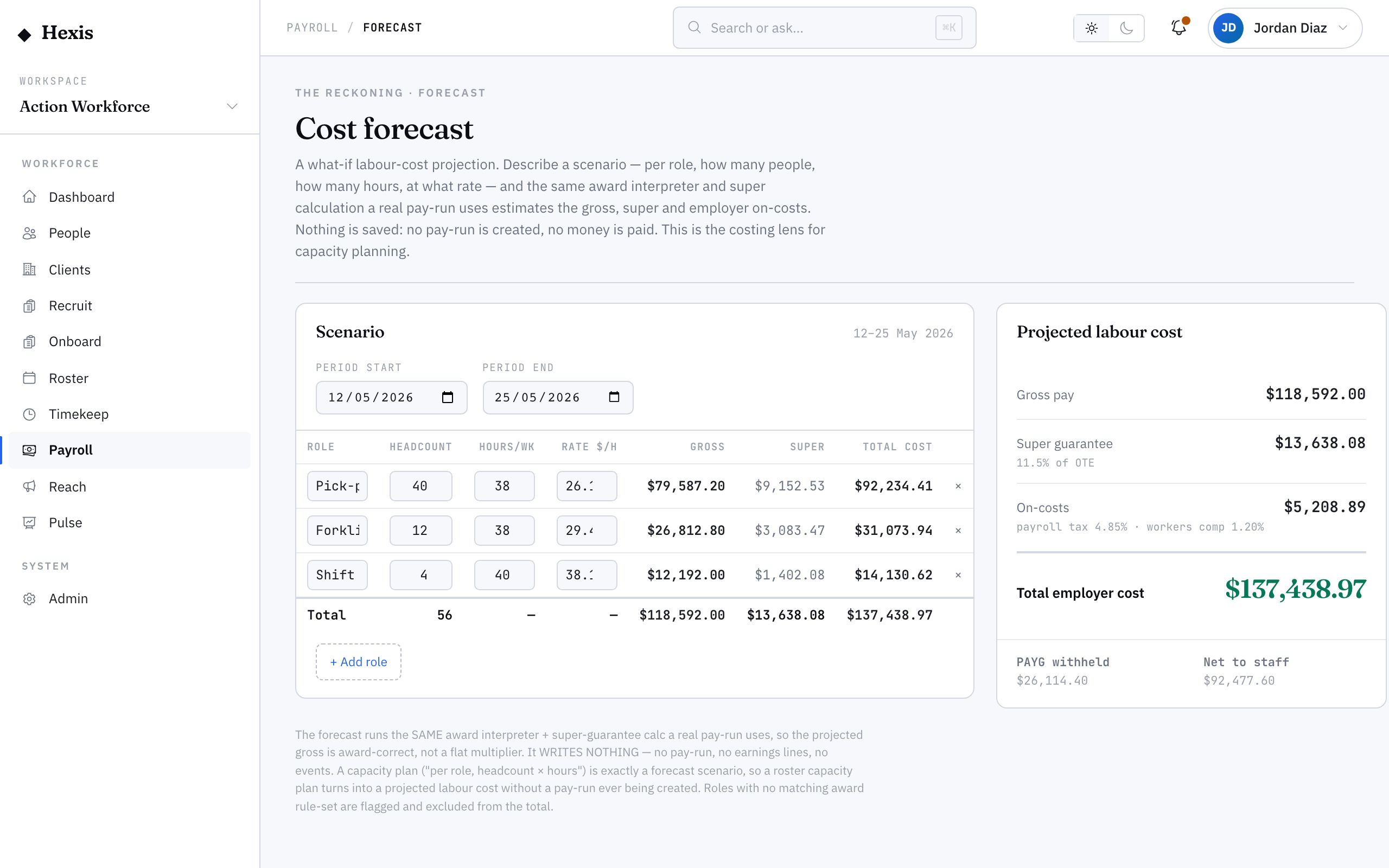
A cost forecast answers “what would this cost us?” before anyone works a shift. You build a scenario — a period, and per role a headcount, hours per week and a rate — and Hexis runs it through the same award interpreter and super calculation a real pay run would, then returns a projected breakdown: gross per role, super, on-costs like payroll tax and workers’ compensation, and the total cost to employ.
Every other payroll surface looks backwards at runs already paid; this one looks forward. Use it when you’re pricing a new contract, weighing up extra headcount, or checking a roster against a budget — because it uses the real pay rules, the number is one you can actually plan against.
When to use it
- You’re pricing a new client contract and need a labour cost
- You’re weighing whether to add headcount to a site
- You want to check a proposed roster against a budget before committing
- You need a projected total cost to employ, not just gross wages
How it works
Step by step.
- 1
Open the forecast
Start a new scenario and set the period you want to cost.
- 2
Add roles
For each role, enter a headcount, hours per week and a rate. The scenario is just the shape of the work you’re modelling.
- 3
Run the projection
Hexis applies the same award interpreter and super-guarantee calculation a real run uses, returning a per-role gross, super and total cost.
- 4
Read the cost card
See the build-up from gross pay to super guarantee to on-costs — payroll tax and workers’ compensation — to total cost to employ.
- 5
Compare and decide
Read the scenario total against your budget or contract price. Adjust the roles and re-run to find the shape that fits.
Worked example
Follow it through.
The scenario
Northwind Workforce is pricing a new Coastline Logistics contract at Harbour Point Terminal for a 4-week period.
- 1 Start a scenario for the 4-week period.
- 2 Add 6 Forklift Operators at 38 hours/week and $36.50/h, plus 2 Traffic Controllers at 38 hours/week and $39.20/h.
- 3 Run the projection; per-role gross comes back, with forklift gross at $33,288 over the period.
- 4 The cost card builds gross → super guarantee → payroll tax and workers’ comp → total cost to employ.
- 5 The scenario total lands at roughly $58,400 fully loaded for the period.
The result
A projected, fully-loaded labour cost of about $58,400 for the 4-week scenario, ready to price the contract against.
Tips & notes
Good to know.
- The forecast uses the same rules a real run does, so the number is planning-grade — not a rough multiplier.
- Total cost to employ includes on-costs like payroll tax and workers’ comp, which is why it’s higher than gross wages — price against the total, not the gross.
- Model the roster you actually expect; small changes to hours or headcount move the total in ways a flat rate can’t capture.
- Re-run with adjusted roles to find the shape that fits a budget before you commit a single shift.
When you’re done
A projected, fully-loaded labour cost for a modelled scenario you can price, budget or staff against with confidence.