What it is
Back pay is what you owe when a pay increase is backdated — a new award rate or an agreement change that takes effect before it was applied. Hexis handles it by re-running the award interpreter over each already-finalised period at the new base rate, holding the hours and rules constant, and paying the positive difference as an arrears adjustment in the next open run. The arrears ledger is the audit of that, period by period.
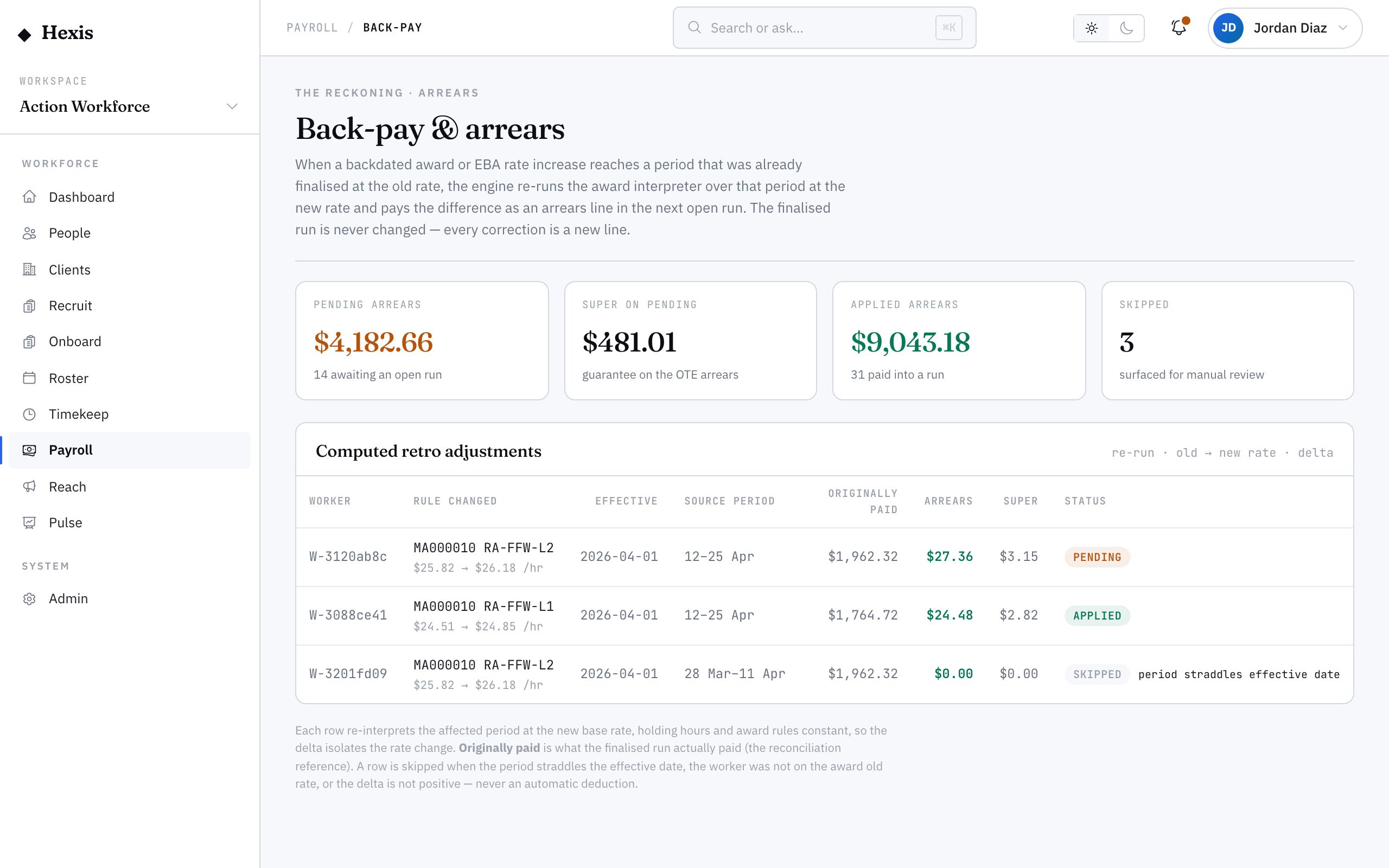
Arrears are where underpayments and overpayments are made right, so they have to be exact and defensible. This board shows what’s pending, what’s been applied, what was skipped and why, and the computed difference for each affected period — so you can see precisely how every cent of back pay was reached.
When to use it
- A backdated award or agreement increase reaches periods already paid
- You need to confirm how much back pay each worker is owed
- You’re auditing how an arrears figure was computed
- You want to see what arrears were applied in the latest run
How it works
Step by step.
- 1
Open the arrears ledger
The summary tiles show pending arrears and super owed, arrears already applied, and how many computations were skipped.
- 2
Read the provenance rows
Each row is one computed adjustment — the worker, the affected period, the old and new base rate, and the difference owed.
- 3
Confirm the re-computation
The interpreter re-ran each finalised period at the new rate with the same hours and rules; check the difference reflects the rate change, not a changed timesheet.
- 4
Review skips
A skipped row states why — a period already at the new rate, or no positive difference. Confirm the skips are correct.
- 5
Apply in the next run
Pending arrears are paid as an adjustment line in the next open run. Finalise that run to settle the back pay and its super.
Worked example
Follow it through.
The scenario
A 3% backdated increase to a warehousing award reaches three already-paid fortnights for Northwind Workforce.
- 1 Open the arrears ledger; the tiles read pending arrears $2,940 and super owed $352.80.
- 2 Tom Okafor’s rows show three affected fortnights, old base $32.10, new base $33.06, difference $284.40 total.
- 3 One fortnight is skipped — he had no warehouse hours that period, so no positive difference.
- 4 You confirm the differences reflect the rate change only, with hours unchanged.
- 5 The pending arrears apply as an adjustment line in the next open run, which you finalise.
The result
Each affected worker’s back pay is computed per period, applied as an arrears line in the next run, and the super on it is owed and tracked.
Tips & notes
Good to know.
- Arrears hold the hours and rules constant and change only the rate, so a difference that doesn’t match the rate change is worth investigating.
- Back pay attracts super too — the ledger shows super owed alongside the arrears so the contribution isn’t missed.
- A skipped computation is normal, not an error — it means the period had no positive difference; confirm the reason and move on.
- Arrears are paid as a clearly-labelled adjustment line in the next run, so the worker’s payslip shows the back pay separately.
When you’re done
Exact, period-by-period back pay computed and applied as an arrears line in the next run, with super accounted for.