What it is
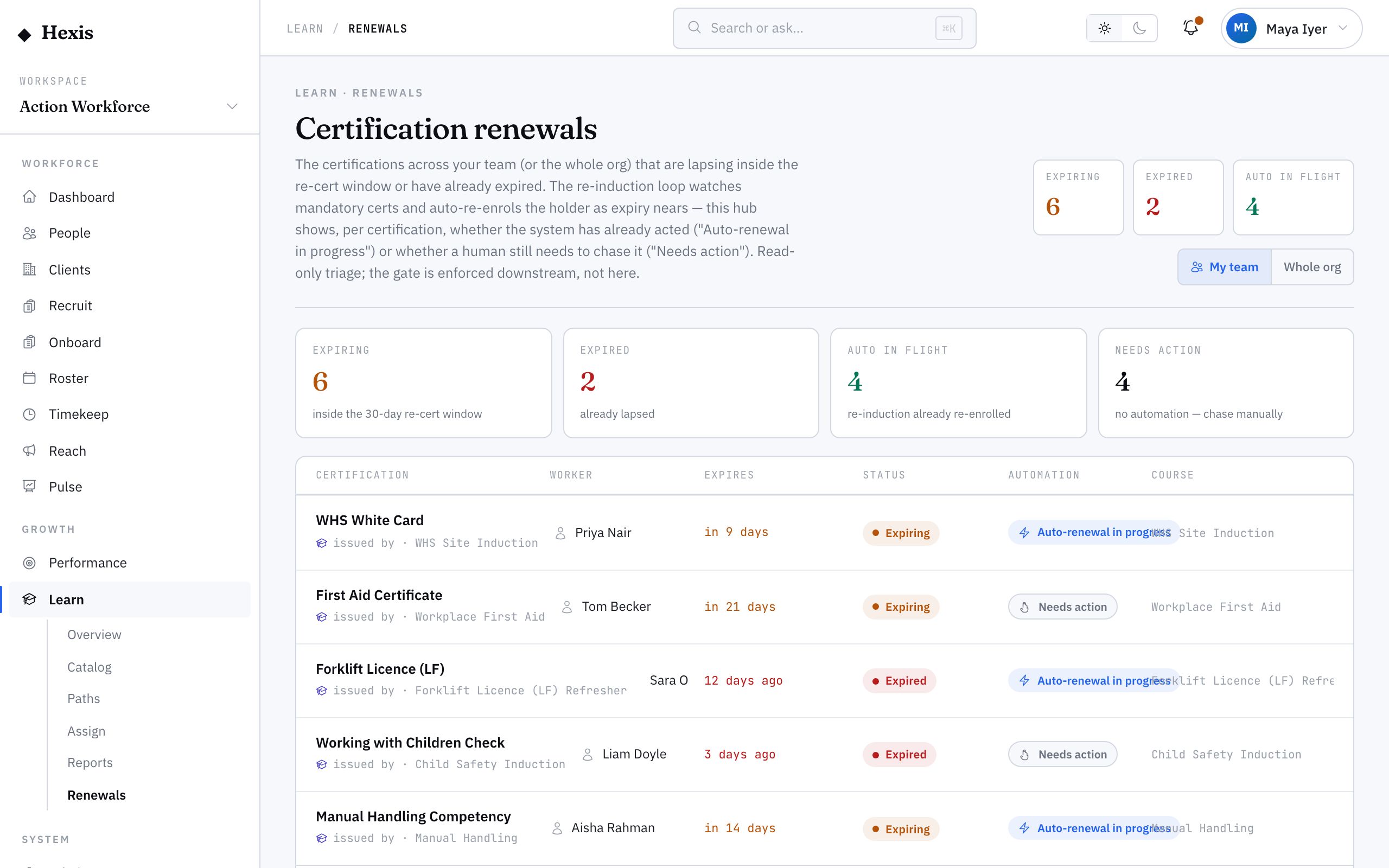
Renewals is the watch-list for credentials that are about to expire. It gathers every ticket and certification nearing its lapse date, ordered by urgency, and gives you the action to refresh each one — re-running the course, recording new evidence, and resetting the expiry clock.
It matters because expiry is the quiet risk in any workforce. A ticket lapses, a worker turns up to site, the client checks, and the shift is lost. Renewals turns that into a planned task done in advance: see what’s coming, renew it early, and keep everyone deployable.
When to use it
- A credential is within its renewal window and needs refreshing
- You’re planning ahead so no ticket lapses before a booked shift
- A worker’s licence is about to expire and they need to redo the course
- You’re clearing a whole team’s upcoming expiries in one pass
- A recurring mandatory course has come due again
How it works
Step by step.
- 1
Open renewals
From the Learn home, open renewals. Every credential nearing its lapse date is listed, sorted by how soon it expires.
- 2
Spot the urgent ones
Items closest to expiry sit at the top with days remaining. Anything already overdue is flagged so it can’t be missed.
- 3
Start a renewal
Pick a credential and start its renewal. This re-enrols the worker in the underlying course so they can complete it again.
- 4
Complete and record evidence
The worker finishes the course or reassessment; new evidence is attached and the credential’s issue date updates.
- 5
Confirm the reset
The expiry clock resets from the new completion, the credential returns to valid, and it drops off the watch-list.
Worked example
Follow it through.
The scenario
Aisha Rahman’s first-aid certificate expires Fri 20 Jun, and she’s rostered for Brightwater Health shifts through July.
- 1 A manager opens renewals; Aisha’s first-aid certificate sits near the top, 13 days remaining.
- 2 They start the renewal, which re-enrols Aisha in the first-aid refresher course.
- 3 Aisha completes the refresher and the new assessment evidence is attached.
- 4 The credential’s issue date updates and its expiry resets to a year out.
- 5 The certificate returns to valid and drops off the watch-list.
The result
Aisha’s first-aid certificate is renewed with a fresh expiry, her July shifts are safe, and the watch-list is one item shorter.
Tips & notes
Good to know.
- Renew inside the window, not on the day — chasing a last-minute lapse is how shifts get lost.
- Recurring mandatory courses appear here automatically when their cadence comes due, so renewals and recurring training share one queue.
- Clearing a team’s upcoming expiries in one weekly pass keeps everyone deployable and the watch-list short.
- If a worker can’t renew in time, flag it early so scheduling can plan around the gap rather than discover it at the gate.
When you’re done
Expiring credentials are refreshed ahead of their lapse date, keeping workers deployable.