What it is
A rotation is a pattern with a swing built on top: a block of days on, then a block off, repeating. It’s how remote and continuous sites stay staffed — one crew works the on-block while another rests, then they switch, so the site never goes dark across the off days.
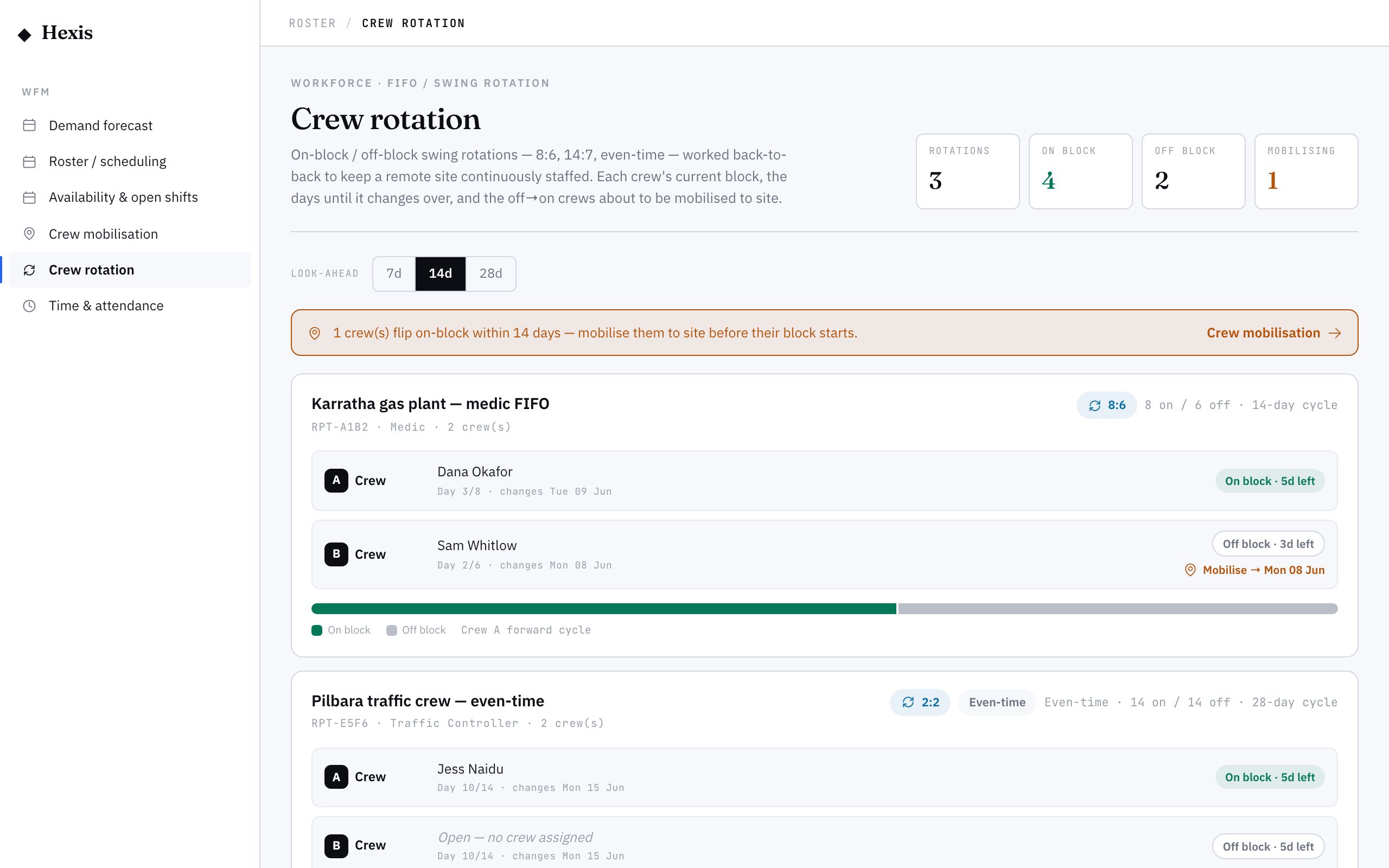
The rotation board shows every swing roster for your operation. Each rotation knows its cycle — how many days on, how many off — and which crew is on the rota at any point. Shifts are drafted only on on-block days for the crew that’s up, and crews are phased so the next one starts as the last one stands down.
When to use it
- You staff a remote or continuous site with rotating crews
- You run a fly-in fly-out roster with on and off blocks
- Two or more crews need to cover one site back-to-back
- You want the swing handled for you rather than counted by hand
How it works
Step by step.
- 1
Open the rotation board
See every swing roster for the operation, with its on/off cycle and which crew is currently up.
- 2
Start from a pattern
A rotation is built on an ordinary recurring pattern — set the site, role and daily times first, the way you would for any standing roster.
- 3
Define the swing
Add the rotation cycle: how many days on, how many days off. This masks the pattern so shifts only fall on on-block days.
- 4
Assign the crews
Name the crews that share the site and set how they’re phased, so the next crew comes on as the previous one stands down.
- 5
Generate the rotation
Generate forward. Shifts draft only on each crew’s on-block days, tagged to the right crew, with the off days left clear.
- 6
Check the handover
Review the board around a changeover to confirm the crews line up back-to-back with no gap and no overlap at the swing.
Worked example
Follow it through.
The scenario
Harbour Point Terminal needs round-the-clock Traffic Controllers on a two-weeks-on, one-week-off swing across two crews.
- 1 Open the rotation board and start a pattern for the Traffic Controller role at Harbour Point Terminal.
- 2 Set the cycle to 14 days on, 7 days off.
- 3 Create Crew A and Crew B, phasing Crew B to start as Crew A’s on-block ends.
- 4 Generate forward six weeks.
- 5 Check the changeover on Mon 23 Jun — Crew B comes on the morning Crew A finishes.
The result
Six weeks of Traffic Controller shifts are drafted across two crews, each tagged to its crew, with the site covered continuously and a clean back-to-back handover at every swing.
Tips & notes
Good to know.
- Phase the second crew by the on-block length so there’s no gap and no double-up at the changeover.
- Rotations build on the same pattern engine, so generation is just as safe to re-run — it tops up and skips duplicates.
- Tag shifts to the crew, not the individual, so you can swap people within a crew without rebuilding the swing.
- Use the on/off cycle to keep rest days honest — the off-block protects fatigue limits for remote crews.
When you’re done
A continuous remote site is staffed by rotating crews, drafted automatically on the right on-block days with clean handovers.